
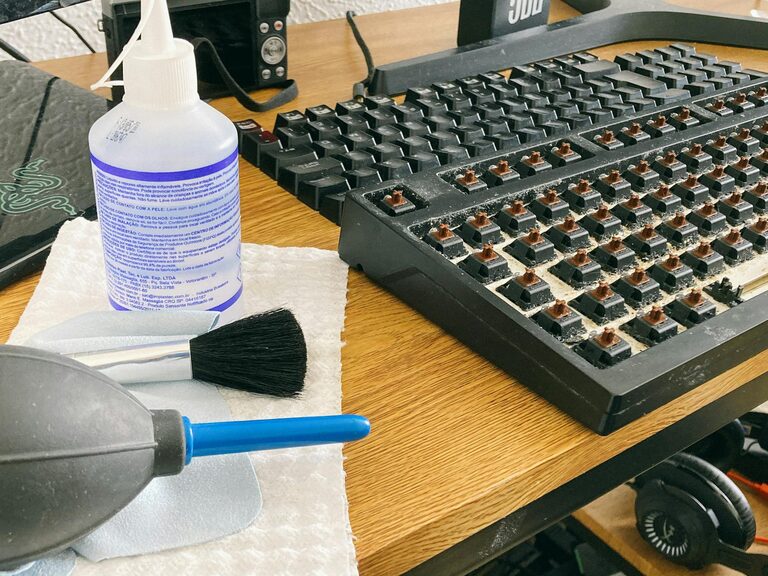
Keeping your phone and keyboard clean is essential for both hygiene and device longevity. These everyday items can harbor dust, dirt, oils, and germs, but cleaning them improperly can cause damage. This guide will walk you through safe and effective steps to clean your phone and keyboard, using materials you likely already have at home.
Why It’s Important to Clean Your Phone and Keyboard
Our phones and keyboards are constant companions in daily life. Touch screens and keys attract fingerprints, residue, and microbes, some of which can lead to unpleasant odors or even health risks. Regular cleaning not only reduces germs but also improves device performance—dust and debris can impact keyboard responsiveness and phone sensors.
What You’ll Need for Cleaning
Before you start, gather the following supplies to clean safely:
– Microfiber cloths: gentle and nonabrasive
– Isopropyl alcohol (70% or above) or disinfectant wipes (alcohol-based)
– Compressed air canister (optional)
– Cotton swabs
– Distilled water (to dilute alcohol or for gentle cleaning)
– Soft brush (like a clean paintbrush or toothbrush)
Avoid using harsh chemicals, abrasive cleaners, or paper towels, which can scratch surfaces.
—
How to Clean Your Phone Safely
Step 1: Power Off Your Phone
Switch off your phone and disconnect any cables or accessories. This minimizes the risk of short circuits or damage during cleaning.
Step 2: Remove the Case and Accessories
If your phone has a case, remove it. Cases can be cleaned separately with soap and water if they’re silicone or plastic.
Step 3: Wipe Down the Surface
Dampen a microfiber cloth slightly with a mixture of 70% isopropyl alcohol and distilled water (approximately a 1:1 ratio), or use an alcohol-based disinfectant wipe. Avoid soaking the cloth—excess moisture can damage your phone.
Gently wipe all surfaces, including the screen, back, and edges. Use circular motions for fingerprints and smudges.
Step 4: Clean Buttons and Ports
Use a dry cotton swab to gently clean around buttons and in charging port openings. Avoid inserting anything deep inside ports, which could cause damage.
Step 5: Dry Completely
Allow your phone to air dry for a few minutes before turning it back on or putting the case back on.
—
How to Clean Your Keyboard Safely
Step 1: Unplug or Power Off Your Keyboard
If you’re using a wired keyboard, unplug it. For wireless models, turn off the device or remove batteries if possible.
Step 2: Shake Out Loose Debris
Turn the keyboard upside down and gently shake it to dislodge dust, crumbs, and other particles trapped beneath the keys.
Step 3: Use Compressed Air
Aim a can of compressed air between the keys to blow away remaining dust. Hold the can upright and use short bursts to avoid moisture buildup.
Step 4: Wipe the Surface
Dampen a microfiber cloth with isopropyl alcohol (70% or higher). Gently wipe the key surfaces and surrounding areas. For mechanical keyboards or textured keys, you can use a soft brush to loosen grime.
Step 5: Clean Between Keys
For more thorough cleaning, lightly dampen a cotton swab with alcohol to clean spaces between the keys.
Step 6: Dry and Reassemble
Let your keyboard dry completely before plugging it back in or turning it on.
—
Tips for Maintaining Clean Devices
– Wash your hands before using your phone or keyboard to reduce dirt buildup.
– Avoid eating or drinking near your devices to prevent spills and crumbs.
– Clean your phone and keyboard regularly—aim for at least once a week depending on use.
– Use screen protectors and keyboard covers to make cleaning easier and provide extra protection.
—
What to Avoid When Cleaning Your Devices
– Don’t spray liquids directly onto your phone or keyboard.
– Avoid bleach, ammonia, or harsh chemically based cleaners.
– Avoid using abrasive materials like paper towels or rough cloths.
– Don’t use excessive moisture to prevent liquid damage inside your devices.
—
Conclusion
Cleaning your phone and keyboard safely is simple and effective when you use the right tools and follow careful steps. Regular maintenance keeps your gadgets hygienic and ensures they work well for a long time. With just a few minutes of care, you can enjoy cleaner, healthier, and better-performing devices every day.
—
If you found this guide helpful, bookmark it and share with friends who want to keep their tech clean!